
Product · the SIVI VB-PUO platform
One workspace for the monthly SIVI exchange
WTP Data Lab receives, validates, visualises and delivers SIVI VB-PUO messages for every fund and counterparty you serve. It runs beside your administration platform, read-only, as SaaS or self-hosted in your own environment.
Release 2026 and Release 2027 side by side · SaaS or self-hosted · Pilot live within weeks
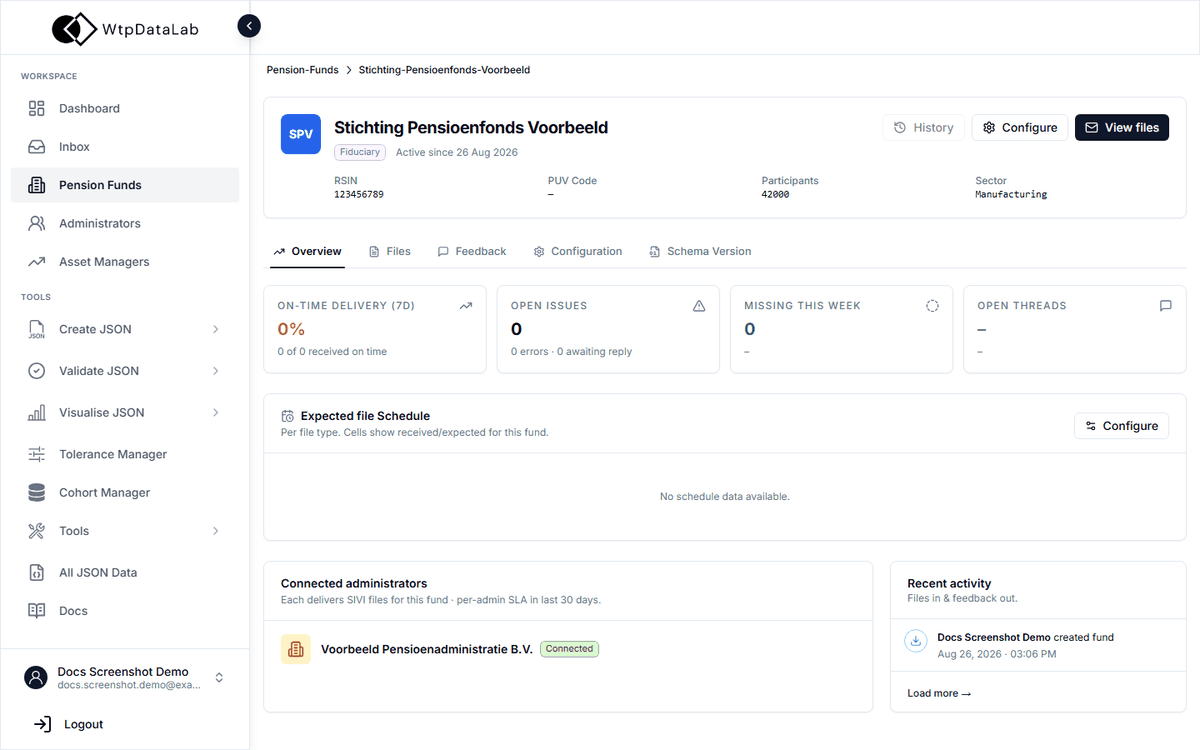
Everything the chain needs, in one place
Dashboard
Coverage, SLA and what needs your attention today, across all funds.
Inbox
Every inbound and outbound message with its validation status and feedback thread.
Pension funds
Mandate, expected schedule, schemes and cohorts, routing and audit log per fund.
Administrators and asset managers
Counterparties with SLA terms, files delivered, active errors and API configuration.
Create, validate, visualise
All 16 message types as forms, validation reports, tables and charts.
Tolerance and cohort manager
Threshold rules on any JSON path of a message; cohorts per fund.
Data Bridge API
Inbound and outbound delivery, feedback API, an API key per counterparty.
Roles and audit
Role templates per module, organisation admins, a complete audit trail.
Dashboard
Know before 9 a.m. which files are late
The dashboard opens on what needs attention: messages awaiting your action, threads awaiting an administrator’s reply against their SLA tier, and today’s coverage per fund and SIVI type. The expected-file schedule shows received against expected for the week.
- Awaiting your action, with escalation after 24 hours
- Coverage matrix per fund and SIVI message type
- Expected-file schedule: met, partial, pending, missing
- Activity by pension fund, in real time
| 0001a | 0001b | 00002 | 00541 | 00553 | 00556 | |
|---|---|---|---|---|---|---|
| Stichting Pensioenfonds Voorbeeld | ||||||
| APF Compartiment Noord | ||||||
| Pensioenfonds Delta |
/party/0/pension/0/pension/1/startAmount/party/0/pension/0/startAmountInbox
Every message, its verdict and its feedback in one thread
Inbound messages from administrators, messages pending to send, and the feedback exchanged about them. Open a message to see who sent it, for which fund, against which schema version, and exactly which checks failed, with the JSON path to fix.
- Inbound, internal and user-generated messages, with bulk feedback
- Validation status per message and per chunk
- Feedback message (accepted or rejected) generated from the report
- Manual upload for counterparties without an API
Validate
Schema, code lists and consistency rules, per release
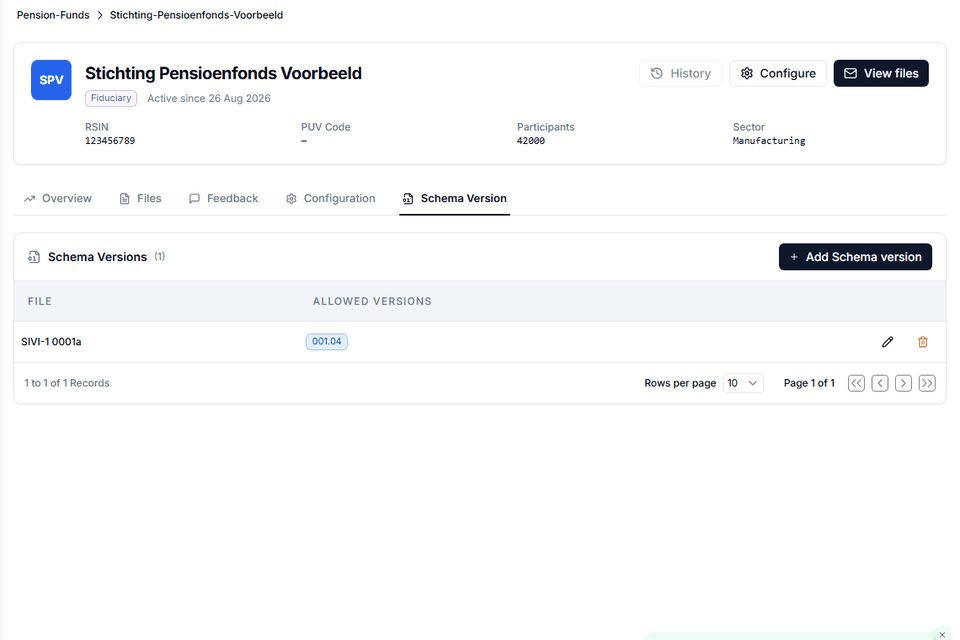
Each message is validated against the JSON Schema of its release (2026, schema 001.04, or 2027, schema 001.05), the AFD code lists and consistency checks based on the handleiding. The allowed schema versions are set per fund and message type, so a chain can migrate one link at a time.
- Release 2026 and Release 2027 side by side
- Code lists AFDIDP, AFDRES, AFDCOA, AFDSWI, ADNFUN, ISOVAL
- Consistency checks: switch pairs, reporting periods, reserves; cohort sums as a warning
- Additional mandatory fields on top of the standard, per fund
/party/0/pension/0/pension/1/startAmount
/party/0/pension/0/startAmount
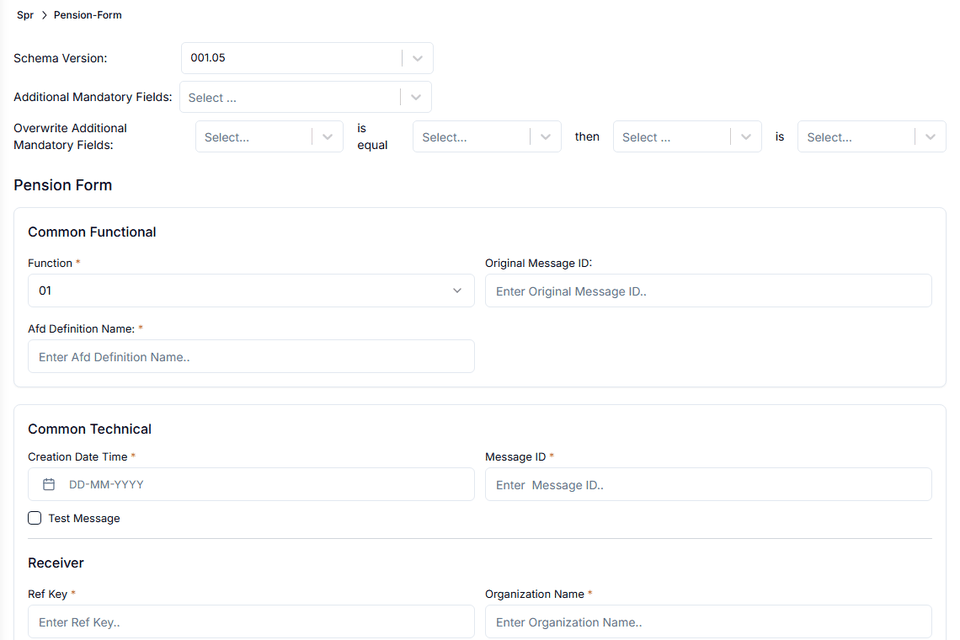
Create and visualise
Forms for all 16 messages, tables and charts for analysts
Analysts build a message in a form that knows the schema version, the required fields and the code lists, instead of hand-editing JSON. Visualise turns any message into readable tables and charts of cohorts, portfolios and pools.
- SPR, FPR and the feedback message
- Schema version selected per message
- Tables, bar, pie and time charts per pension and cohort
- JSON Viewer and JSON Explorer for raw files
Pension funds
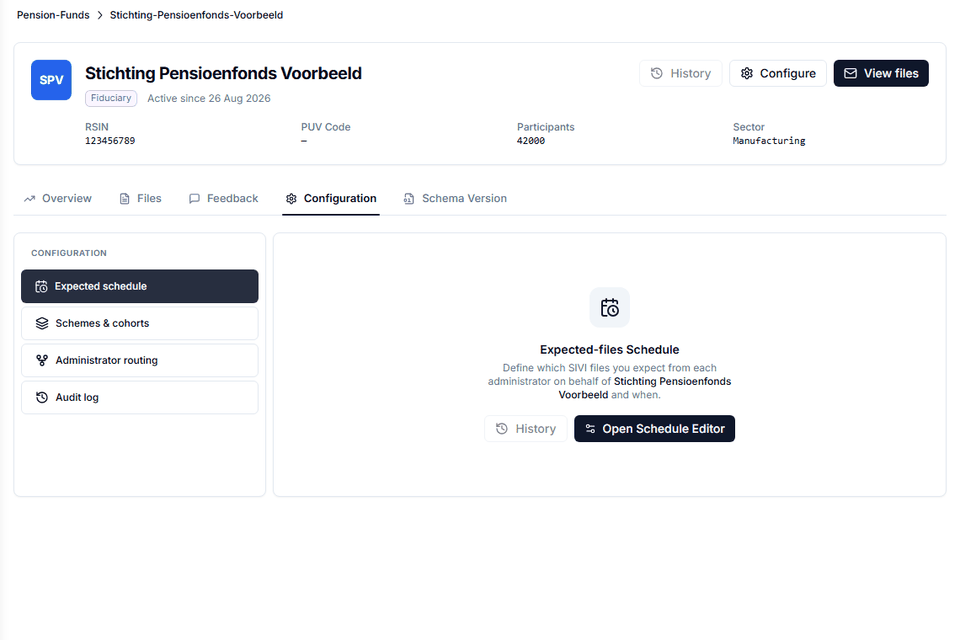
Everything about a fund on one page
Per fund: RSIN and PUV code, mandate, participants, the administrators that deliver for it, the expected-file schedule, schemes and cohorts, routing and the audit log. On-time delivery, open issues and missing files are tracked per fund over the last seven days.
- Allowed schema versions per fund and message type
- Expected-files schedule per administrator
- Schemes and cohorts, administrator routing, audit log
- Received and sent feedback per fund
Administrators and asset managers
Counterparties with SLA terms and their own API configuration
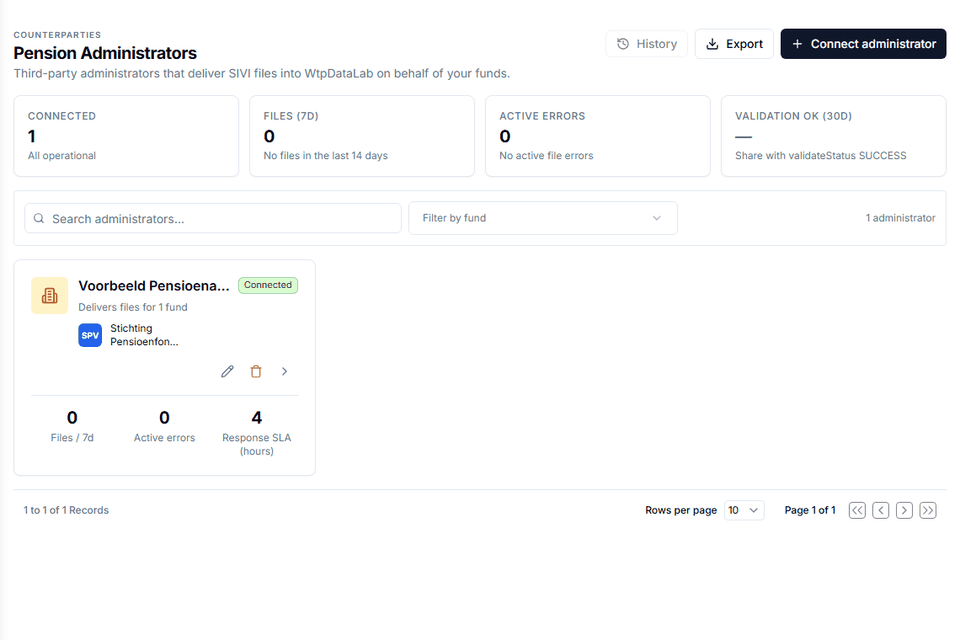
Administrators deliver files for one or more funds; asset managers are the fiduciary managers, investment administrators and pool administrators of the FPR value cycle. Each has SLA terms, reply times, files delivered and active errors, and its own API key.
- Connect a counterparty and issue its API key
- Response SLA in hours, per tier
- Files per seven days, active errors, validation OK rate
- Export and history
Data Bridge and API
Machine-to-machine delivery, both directions
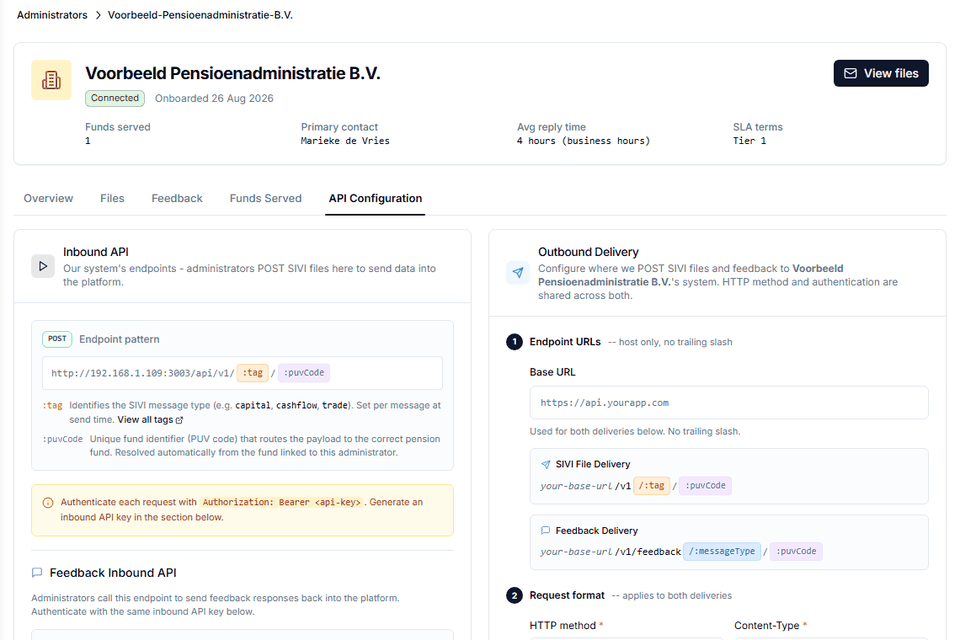
Counterparties POST SIVI files to your inbound endpoint, tagged by message type and routed by PUV code. Outbound delivery pushes validated files and feedback to their system with the method, content type and authentication they require. The API reference is in the product.
- Inbound: POST /api/v1/:tag/:puvCode with a Bearer API key
- Feedback inbound API for administrators
- Outbound delivery to any base URL, per counterparty
- Chunk size for large messages, configured per organisation
Tolerance and cohort manager
Bands around any value, warnings before month-end
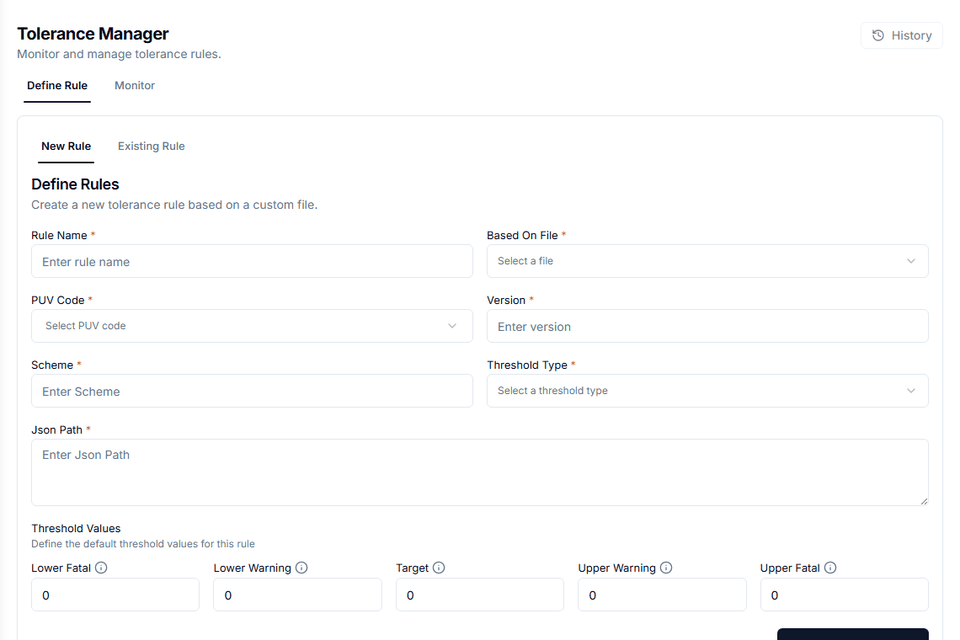
Define tolerance rules on any JSON path of a message, per PUV code, version and scheme, with lower and upper warning and fatal thresholds around a target. The monitor shows which files breached which band. The cohort manager keeps cohorts and their pension providers per fund.
- Threshold types with lower and upper warning and fatal values
- Rules based on a reference file
- Monitor tab with history
- Cohorts per fund and mandate
Roles and organisations
Role templates per module, an admin per organisation
Role templates decide who sees which modules, down to a single message type. Organisation admins manage their own users; the platform admin manages organisations. The allowed schema versions per fund keep a migrating chain under control, and every change lands in the audit log.
- Role templates for workspace and tools modules
- Organisation admin and platform admin
- Audit log per fund and per organisation
- In-app documentation and API reference
Plans
Free
Create, validate and visualise SIVI-bericht 1 (0001a), plus the JSON Viewer and JSON Explorer. For analysts who want to try the standard.
Enterprise
The workspace (dashboard, inbox, pension funds, administrators, asset managers), all 16 messages, tolerance and cohort manager, all JSON data, the Data Bridge API, roles and audit.
Self-hosted
The same platform as Docker images in your own environment, with your own database and keys. For organisations whose policy keeps pension data on their own infrastructure.
Questions about the platform
How do counterparties deliver files?
Through the inbound API (a POST per message, authenticated with the API key you issue) or by manual upload in the inbox. Feedback goes back the same way, or is pushed to their system through outbound delivery.
Which schema releases are supported?
Release 2026 (schema 001.04) and Release 2027 (schema 001.05), side by side. The allowed versions are set per fund and message type, so one counterparty can migrate while another has not.
Can we run it ourselves?
Yes. The platform is available as Docker images for self-hosting, with the same modules as the SaaS version. Hosting, data residency and escrow arrangements are documented on request.
Who sees what?
Each organisation has its own tenant, users and role templates. A role template enables modules down to a single message type, and the audit log records every change.
How long does onboarding take?
A pilot with one fund and one counterparty is typically live within weeks: add the fund, connect the administrator, set the expected schedule and the allowed schema version, and share the API key.
What does it change in our administration platform?
Nothing. WTP Data Lab is read-only beside your system of record; it validates and exchanges what goes in and out.
See the platform with your own message
Bring a sample SPR or FPR message. In 20 minutes we validate it live, show the inbox, the report and the feedback message, and discuss whether a pilot fits your chain.